What prints with the starting settings
| Paper | US Letter — 215.9 × 279.4 mm (8.5 × 11 in) |
|---|---|
| Grid | 12 × 12 letters |
| Words hidden | 12 of 12 |
| Margins | 1/2″ |
| Line weight | 0.18 mm (bold 0.35 mm) |
| Print setting | Scale 100% / Actual size |
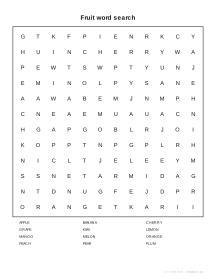
Your words, your puzzle
Word searches are a favourite for spelling practice, vocabulary review, parties and quiet time. The fun is in the words, so this maker lets you choose them: this week’s spelling list, science vocabulary, the names of everyone at a birthday party, or a holiday theme.
How it works
- Type your words, separated by commas or new lines.
- Add a title, choose the grid size and the directions words may run.
- Press New puzzle until you like the layout.
- Download the PDF: the puzzle with its word list, plus an answer page.
Tips for good puzzles
- Mix long and short words; long words are placed first so they fit.
- Keep easy puzzles small; an 8 × 8 grid with six words is plenty for early readers.
- For a challenge, choose Hard: backwards words are hard to spot.
- Use themed lists so the puzzle doubles as revision.
Printing tips
Print at 100% / Actual size. The answer key is on page 2, so print page 1 only for students.
Popular word search sheets
- Christmas word search printable
- Fall word search printable
- Word search maker for kids
- Halloween word search printable
- Ocean animals word search printable
- Sports word search printable
- Thanksgiving word search printable
- Winter word search printable
- Hard word search maker (15 × 15)
- Large-print word search maker
Frequently asked questions
How many words can I use?
Up to 60 words of 2 or more letters. The puzzle places as many as fit and the spec line tells you if any were left out, in which case make the grid bigger or remove a long word.
What do the difficulty levels change?
Easy places words only across (left to right) and down. Medium adds diagonals. Hard also allows words backwards in every direction, which is much harder to search.
Can I make a different puzzle with the same words?
Yes. Press New puzzle or change the puzzle number. The same words and number always give the same grid, so you can share an exact puzzle with a class.
Does it include an answer key?
Yes. With Answer page on, the PDF has a second page with every hidden word highlighted.
What happens to spaces, numbers and accents?
Only the letters A to Z are used: spaces, hyphens, digits and punctuation are removed and words are printed in capitals. Accented letters are dropped, so type them without accents.
Which grid size should I choose?
10 × 10 to 12 × 12 for younger children with short words; 15 × 15 for a typical adult puzzle; up to 20 × 20 for long word lists.
Last updated · About us