What prints with the starting settings
| Paper | US Letter — 215.9 × 279.4 mm (8.5 × 11 in) |
|---|---|
| Agenda | 4 numbered lines |
| Attendees | 6 names |
| Actions | 5 rows (fewer on small paper): action, owner, due, done |
| Decisions box | No |
| Margins | 1/2″ |
| Line weight | 0.18 mm (bold 0.35 mm) |
| Print setting | Scale 100% / Actual size |
Meetings that lead somewhere
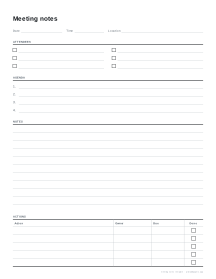
A meeting is only as useful as what happens after it. The part that most often goes missing is the action list: who agreed to do what, and by when. This template puts the action table at the bottom of every page, with columns for the owner, the due date and a box to tick, so it is filled in before everyone leaves the room.
How the page is laid out
- Date, time and location across the top.
- Attendees in two columns, each with a box to tick for who was present.
- Agenda, numbered, typed in advance or written on the day.
- Decisions (optional), for formal minutes.
- Notes, lined, filling the rest of the page.
- Actions, a table of action, owner, due date and done.
Tips for useful notes
- Write actions as verbs with one owner: “Sam: send the revised budget” rather than “Budget”.
- Give every action a date, even a rough one. Undated actions rarely happen.
- Note decisions in one line each, separate from the discussion, so they can be found later.
- Read the actions back in the last two minutes of the meeting, then share a photo or scan of the page.
Printing tips
Print at 100% on Letter or A4. For a meeting series, print a stack and keep them in a binder in date order; the action table on each page becomes a running record of what was agreed. For lectures and study notes, the Cornell notes layout suits better.
Popular meeting notes template sheets
Frequently asked questions
What should meeting notes include?
The date, time and place; who attended; the agenda; the main points discussed; any decisions; and a list of actions, each with one owner and a due date. The template has a section for each, in that order.
Can I print the agenda on the template?
Yes. Type one agenda item per line in the Agenda items box and they print as a numbered list. Leave it empty for numbered blank lines instead.
How many action items fit?
Five rows by default and up to twelve. On small paper such as A5 the table gives up rows so the notes area keeps at least four lines.
What is the difference between meeting notes and minutes?
Notes are for the people in the room and can be informal. Minutes are the official record of a formal meeting, such as a committee or board, and record decisions and votes. Switch on the Decisions box for minutes.
Can I use it for one-to-one meetings?
Yes. Set the attendee rows to one and type a standing agenda, such as wins, blockers and goals. See the one-on-one version for a ready-made layout.
Last updated · About us