What prints with the starting settings
| Paper | US Letter — 215.9 × 279.4 mm (8.5 × 11 in) |
|---|---|
| Layout | Daily ticks, 7 days |
| Chores | 8 printed, 2 empty rows |
| Pages | 1 (write the name in) |
| Margins | 1/2″ |
| Line weight | 0.18 mm (bold 0.35 mm) |
| Print setting | Scale 100% / Actual size |
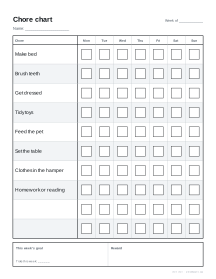
A chart that children can use themselves
A chore chart works when a child can read it, reach it and tick it without asking. This one has large tick boxes, one row per chore, light banding so a finger can follow a row across, and the days printed along the top. The goal and reward box at the bottom gives the week a point.
How to use it
- Type the chores, one per line. Keep each one short and specific: “Clothes in the hamper”, not “Tidy room”.
- Add names to print one chart per child, or leave it blank and write the name in.
- Choose the layout: daily ticks for routines done every day, or the family job list for weekly jobs shared out across the household.
- Download the PDF and stick it where the jobs happen, such as the fridge or the bedroom door.
Chore ideas by age
Children differ, so treat these as starting points rather than rules.
| Age | Ideas |
|---|---|
| 3 to 5 | Put toys away, put clothes in the hamper, help feed a pet, carry their plate to the kitchen |
| 6 to 8 | Make the bed, set and clear the table, water plants, sort laundry by colour, pack the school bag |
| 9 to 12 | Load or empty the dishwasher, vacuum a room, take out the bins, help cook a simple meal, fold laundry |
| 13 and up | Do their own laundry, clean the bathroom, mow the lawn, cook a family meal, look after younger siblings for short spells |
Making it stick
- Fewer chores, done every day, work better than a long list. Five to eight is plenty for a young child.
- Agree the reward first and write it in the box, so the goal is clear before the week starts.
- Tick together at a set time, such as after dinner, so the chart becomes a habit rather than a nag.
- Start a fresh sheet each week, and keep the old ones; children like to see a stack of finished charts.
For adults’ own routines, the habit tracker gives a month of days per habit, and the checklist template suits one-off lists of jobs.
Printing tips
Print at 100% on Letter or A4. For a reusable chart, laminate it or slip it into a plastic sleeve and use dry-wipe pens.
Popular chore chart sheets
Frequently asked questions
How do I make a chore chart for each child?
Type the names in the Names box, one per line. Each child gets their own page with their name printed at the top, all in one PDF. Up to 12 names.
Can I use my own chores?
Yes. Type one chore per line, or clear the box to print empty rows and write the chores in by hand. Raise Rows under Advanced options to leave empty rows below your chores for adding more later.
Which day does the week start on?
Monday by default. Choose Sunday under Advanced options if your week starts on Sunday.
What is the family job list?
A single page for the whole household: each job has columns for who does it, which day, and a box to tick when it is done. It suits weekly jobs such as vacuuming, laundry or taking out the bins.
How do I reuse a chore chart every week?
Print a stack, or laminate one copy and use a dry-wipe pen. A plastic sleeve over a printed chart also works with dry-wipe pens.
Can I print it smaller for the fridge?
Yes. Choose A5 or Half Letter and the chart fills the smaller page, with fewer rows and a slightly larger chore column.
Last updated · About us