What prints with the starting settings
| Paper | US Letter — 279.4 × 215.9 mm (11 × 8.5 in), landscape |
|---|---|
| Vanishing points | 2 |
| Lines from each point | 36 |
| Margins | 1/2″ |
| Line weight | 0.18 mm (bold 0.35 mm) |
| Print setting | Scale 100% / Actual size |
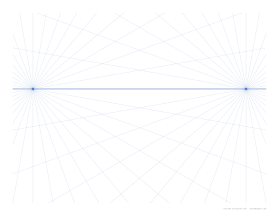
Draw space convincingly
Perspective is the set of rules that makes a flat drawing look deep: parallel lines that move away from us appear to converge on vanishing points on the horizon. Once the vanishing points are in place, drawing a box, a room or a city street becomes a matter of following the guide lines. This grid does the setting out for you.
Options
Number of points. One, two or three.
Horizon. Anywhere from high to low on the page.
Guide lines. From a few to many per point.
Practice ideas
- One-point: a corridor, a railway track, a room seen from the doorway.
- Two-point: a box on a table, a house from the corner, a street crossing.
- Three-point: a skyscraper from the pavement.
Printing tips
Print at 100% / Actual size, landscape. Guide lines are light blue so pencil and ink stand out; set a lighter line colour in the advanced options if you draw directly on the print.
Popular perspective grid sheets
Frequently asked questions
What is the difference between one-, two- and three-point perspective?
In one-point perspective, lines going away from you meet at a single point on the horizon: a road or corridor seen straight on. Two-point perspective has two vanishing points on the horizon, for objects seen at a corner. Three-point perspective adds a third point above or below the horizon for very tall or very low views.
Where are the vanishing points placed?
One-point: the centre of the horizon. Two-point: near the left and right edges. Three-point: the two horizon points plus one near the bottom of the page, for looking up at tall buildings.
Can I move the horizon?
Yes. Horizon height sets it from 15 to 85 percent of the way down the page. A low horizon suggests a worm's-eye view; a high horizon, a bird's-eye view.
How many guide lines are there?
You choose from 8 to 72 per vanishing point. More lines make it easier to find a line close to the angle you need; fewer keep the page calmer.
How do I use it?
Place your drawing paper over the grid on a light box or window, or draw directly on the print in pencil and erase the guides later.
Is isometric drawing the same thing?
No. Isometric drawings have no vanishing points; parallel lines stay parallel. For that, use isometric paper.
Last updated · About us