What prints with the starting settings
| Paper | US Letter — 215.9 × 279.4 mm (8.5 × 11 in) |
|---|---|
| Line spacing | 7.14 mm = 0.281″ |
| Cue column | 2 1/2″ |
| Summary box | 2″ |
| Margins | 1/2″ |
| Line weight | 0.18 mm (bold 0.35 mm) |
| Print setting | Scale 100% / Actual size |
Standard line spacing
| Line spacing | Millimetres | Inches | Note lines on Letter | Note lines on A4 |
|---|---|---|---|---|
| College | 7.14 mm | 0.281″ | 26 | 29 |
| Wide | 8.73 mm | 0.344″ | 21 | 24 |
| Narrow | 6.35 mm | 0.25″ | 29 | 33 |
| 8 mm | 8 mm | 0.315″ | 23 | 26 |
What Cornell notes paper is
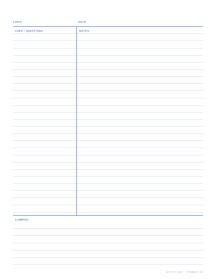
Cornell notes paper divides each page into zones with different jobs. During a lecture or while reading, you write in the large notes area on the right, using short phrases rather than full sentences. Later the same day you go back and fill the narrow cue column on the left with questions, keywords and prompts that the notes answer. Finally you write a short summary at the bottom of the page in your own words.
The method was developed by Walter Pauk at Cornell University in the 1950s, and it is still taught in high schools, college study-skills courses and programs such as AVID. The paper works because it builds review into the page itself: covering the notes column and quizzing yourself from the cues is a ready-made study session. Our Cornell note-taking guide explains the whole routine step by step.
Choosing the layout
Line spacing. College ruling (9/32 inch, 7.1 mm) is the default and suits most high school and university students. Wide ruling (8.7 mm) is easier for younger students and anyone with larger handwriting, while narrow ruling (1/4 inch) packs more onto each page. An 8 mm preset is included for metric notebooks.
Cue column width. The standard 2 1/2 inches leaves about two-thirds of the width for notes on Letter paper. Narrow it to 2 inches if you write long notes and short cues; widen it if you use the column for diagrams, vocabulary or exam-style questions.
Summary box height. Two inches is enough for three or four sentences. If your teacher asks for longer reflections, raise it to 2 1/2 or 3 inches.
Notes area style. Lined suits humanities and most lectures. Choose dot grid for math, science and engineering, where you sketch graphs and diagrams between lines of text. Blank works for visual note-taking and mind maps.
Tips for getting more out of the page
- Write the topic and date in the top band every time. It makes a binder of notes searchable at a glance.
- Leave a line or two between ideas in the notes area so you can add details later.
- Write cues as questions, not headings. “What caused the 1929 crash?” is easier to quiz yourself on than “Causes”.
- Keep the summary honest: if you can’t summarize a page, that is the section to review first.
- Print a week’s worth at once so you never take notes on plain paper and lose the structure.
Before a test, fold the page along the cue rule, or cover the notes with a sheet of paper, and answer each cue aloud. Anything you cannot answer from the cue alone is what to revise first.
Setting it up in the generator
Select Cornell notes as the paper type, then choose Letter or A4. The cue column and summary box switch between inch and metric defaults automatically, and the spec table above shows their exact sizes. Adjust the line spacing, cue width, summary height and notes style, and decide whether you want the printed labels.
From Advanced options you can add header fields such as Name, Class or Period, which is helpful for teachers collecting notes. Line color, weight and style are adjustable too; the default soft blue lines with darker dividers keep the structure clear without overpowering your handwriting. For a binder, set the page count and switch on alternate margins so the cue column always has room for the punch holes.
Printing tips
As with any template, print at Actual size (100%) so the column widths match what you set; Fit to page shrinks everything by a few percent. The A4 Cornell page uses metric proportions for printers outside North America.
If you take notes on both sides, print double-sided with alternate margins on, so the wider binding margin flips to the correct edge on the back of each sheet. A 24 lb (90 g/m²) paper reduces show-through from highlighters, which many students use in the cue column.
Popular Cornell notes paper sheets
Frequently asked questions
What are the three sections of a Cornell notes page?
A narrow cue column on the left for questions and keywords, a wide notes area on the right for what you record during class, and a summary box across the bottom where you condense the page into a few sentences afterward. This template also has a band at the top for the topic and date.
How wide should the cue column be?
The traditional layout uses a cue column of about 2 1/2 inches (63.5 mm) and a summary area about 2 inches (50.8 mm) tall, which are the Letter defaults here. On A4 they default to 60 mm and 50 mm. You can change both in the paper settings if you want more room for notes or for questions.
Who invented the Cornell note-taking system?
Walter Pauk, an education professor at Cornell University, developed it in the 1950s and described it in his book How to Study in College. The page layout is the visible part of a larger routine of recording, reducing, reciting, reflecting and reviewing.
Can I get Cornell notes with a dot grid instead of lines?
Yes. Set Notes area to Dot grid and the right-hand section becomes a dot grid, which suits subjects with diagrams, formulas or chemical structures. There is also a ready-made dot grid Cornell page.
How many lines are there for notes?
On Letter at college-ruled spacing you get 26 lines in the notes area and six more in the summary box. Wide ruling gives 21 and 5. The lines also run under the cue column, so each cue sits beside the note it refers to.
Can I remove the printed section labels?
Switch off Section labels and the words TOPIC, DATE, CUES / QUESTIONS, NOTES and SUMMARY disappear, leaving only the dividing lines. Some teachers prefer the labels on for students who are new to the method and off once the layout is familiar.
How do I print a whole notebook of Cornell pages?
Open Advanced options and set Pages in the PDF to the number you need, up to 200. Turn on page numbers and alternate binding margins if you plan to print double-sided and bind the pages into a notebook.
Last updated · About us