What prints with the starting settings
| Paper | US Letter — 215.9 × 279.4 mm (8.5 × 11 in) |
|---|---|
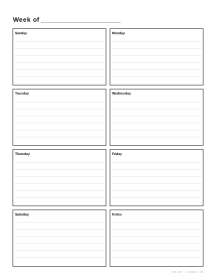
| Layout | Weekly: seven day boxes and a notes box |
| Dates | Undated — reuse every week |
| Margins | 1/2″ |
| Line weight | 0.18 mm (bold 0.35 mm) |
| Print setting | Scale 100% / Actual size |
Weekly or daily?
A weekly page shows seven days side by side with a notes box, which suits most people: appointments, school runs, deadlines and a few reminders. A daily page gives one day the whole sheet, with a schedule down one side and priorities, to-dos and notes on the other, for busy days or detailed time blocking.
Options
Undated or dated. Leave the date empty to print a stack of reusable pages, or enter a start date to date every page automatically.
First day. Weekly pages can start on Sunday or Monday.
Lines. Weekly day boxes can have writing lines or stay blank for drawing and stickers.
Hours. Daily pages show the hours you set, in half-hour steps.
Ideas
- Print four dated weekly pages at the start of each month and keep them on a clipboard.
- Time-block a study day on a daily page, then tick off the to-do list.
- Use undated weekly pages as a family planner on the fridge.
- Combine with a meal planner for the same week.
Printing tips
Print at 100% / Actual size. Punch the left margin for a ring binder; if you need more room for holes, increase the margin in the advanced options.
Popular planner sheets
Frequently asked questions
How do I make dated planner pages?
Type a start date as YYYY-MM-DD, for example 2027-01-04, and set the number of pages in the advanced options. Weekly pages then start on your chosen first day of the week and each following page moves on by a week; daily pages move on by a day.
What is on a daily page?
An hourly schedule with half-hour lines on the left, from the start and end hours you choose, and three sections on the right: top priorities and a to-do list with tick boxes, and notes.
Can I change the schedule hours?
Yes. Schedule starts can be any hour from midnight to noon and Schedule ends any hour from 1 pm to midnight, so very early starts and late evenings both fit.
How many pages can I print at once?
Up to 50 different pages in one PDF, which is almost a year of weekly pages or about seven weeks of daily pages.
Can I print it as a booklet?
Yes. Choose A5 or Half Letter as the paper size and switch on Booklet in Advanced options. The pages, dated or undated, are laid out two to a sheet in folding order, ready to print double-sided and fold.
Is there a monthly view?
Yes, use the monthly calendar alongside these pages.
Last updated · About us