What prints with the starting settings
| Paper | #10 envelope (4 1/8 × 9 1/2 in) — 241.3 × 104.8 mm (9.5 × 4.13 in), landscape |
|---|---|
| Envelopes | 2 |
| Recipient text | 12 pt |
| Address position | Inside the USPS read area |
| Margins | 0.236″ |
| Line weight | 0.18 mm (bold 0.35 mm) |
| Print setting | Scale 100% / Actual size |
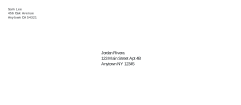
Envelopes without labels or handwriting
Printing straight onto envelopes looks neater than labels and takes less time than writing fifty cards by hand. This printer makes a PDF page the exact size of your envelope, so the printer treats each envelope as a sheet of paper. Your return address goes in the top left of every envelope and each recipient gets their own page.
How it works
- Pick the envelope size from the paper size list: #10, DL, C5, C6, A7 or A2.
- Type your return address, or leave it empty.
- Paste the recipients, each address on its own lines, with a blank line between envelopes.
- Download the PDF and print a single test page before the whole batch.
The text shrinks a little if a line is too long, down to 9 pt, and the panel shows whether the address sits inside the area postal machines read.
Where the address goes
The US Postal Service sorts letters by machine, reading the address with optical character recognition. Its addressing guide, Publication 28, defines where that reading happens:
| Area | Where | What goes there |
|---|---|---|
| OCR read area | 5/8 in to 2 3/4 in above the bottom edge, 1/2 in from each side | The whole delivery address |
| Barcode clear zone | The bottom 5/8 in, from 4 3/4 in in from the right edge | Nothing: the postal barcode is printed here |
| Top left | Above the read area | Return address |
| Top right | Above the read area | Stamp or postage |
The same guide recommends uppercase letters, no punctuation except the hyphen in a ZIP+4 code, and a uniform left margin for every line. Switch on capital letters to follow it.
Address formats
United States. Name; street number and name, with the apartment or suite on the same line where it fits; city, state abbreviation and ZIP Code on the last line.
JORDAN RIVERA
123 MAIN ST APT 4B
ANYTOWN NY 12345-6789
United Kingdom. Royal Mail’s format, as published by the Universal Postal Union, puts the post town in capitals on its own line and the postcode alone on the last line, in capitals, with a single space between its two parts and no punctuation. The county is no longer needed when the post town and postcode are given.
Ms A Patel
Flat 2
15 Example Road
ANYTOWN
AB1 2CD
For mail going abroad, add the country name in capitals as the last line.
Printing tips
- Paper size in the print dialog must match the envelope, and the scale must be 100% or Actual size.
- Test on plain paper first with Show placement guides on, then hold the test print over an envelope against a window.
- Feed one envelope at a time if your printer tends to crease them, and let ink dry before stacking.
- Laser printers fuse toner with heat, so avoid envelopes with plastic windows or self-seal glue strips that the maker does not rate for laser printing.
To make the envelopes themselves from decorative paper, use the envelope template.
Popular envelope sheets
Frequently asked questions
How do I print addresses on envelopes?
Choose your envelope size, type the return address and the recipients (a blank line between each one), then download the PDF. In the print dialog choose the same envelope size as the paper size, set the scale to 100% or Actual size, and feed one envelope at a time to check the way round first.
Can I print a whole list of envelopes at once?
Yes. Paste up to 200 addresses, with a blank line between each, and the PDF has one page per envelope. Print a single page first to check how your printer wants the envelope fed.
Which way do I put the envelope in the printer?
It depends on the printer. Most show an envelope icon on the tray. Do a test on plain paper with Show placement guides switched on, mark the top edge, and match the envelope to it.
Where should the address go on an envelope?
For US letter mail, USPS asks for the whole delivery address inside the OCR read area, between 5/8 inch and 2 3/4 inches above the bottom edge with 1/2 inch side margins, and the bottom right kept clear for the barcode. The printer places it there and the panel tells you if long lines push it out.
Should the address be in capital letters?
USPS Publication 28 recommends uppercase letters and no punctuation for machine reading, though mixed case is delivered too. Switch on capital letters to follow it. In the UK, Royal Mail asks for the post town and postcode in capitals.
Does it work for UK and European envelopes?
Yes. Choose DL, C5 or C6 and write the address in the local format: in the UK, the post town in capitals on its own line and the postcode alone on the last line.
Last updated · About us