What prints with the starting settings
| Paper | US Letter — 279.4 × 215.9 mm (11 × 8.5 in), landscape |
|---|---|
| Desks | 30 (5 rows of 6) |
| Layout | Paired desks |
| Margins | 1/2″ |
| Line weight | 0.18 mm (bold 0.35 mm) |
| Print setting | Scale 100% / Actual size |
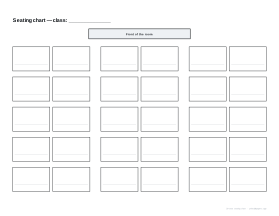
A plan for the room
A seating chart helps a teacher learn names, manage behaviour, pair students and hand over to a substitute. Writing it in pencil on a printed grid makes it quick to change as the class settles.
Options
Desks across and rows. Match the layout of your room.
Pairs. Paired desks with aisles, or single desks evenly spaced. Single rows suit tests and quiet individual work, since every student faces the front and there is a clear path along each row; pairs suit discussion and partner work.
Planning seats
- Pencil names in, so the chart can change without reprinting.
- Seat students who need to see the board, or need extra support, near the front, and mark them with a small star.
- Separate pairs who distract each other.
- Keep one copy in your planner and one in the substitute folder with the timetable.
Uses
- Exams: single desks in rows, with candidate numbers instead of names.
- New classes: learn names in the first weeks of term by keeping the chart on your desk.
- Behaviour plans: record each change and the date you made it.
Pair the chart with an attendance sheet for the same class.
Printing tips
Print at 100% / Actual size. Landscape usually fits a classroom best.
Frequently asked questions
How many desks can the chart show?
From 2 to 8 desks across and 2 to 8 rows, so anything from a small group to 64 places.
What does "Desks in pairs" do?
It groups desks two by two with a wider aisle between each pair, which matches many classrooms. Turn it off for evenly spaced single desks.
Which way round is the room?
The front of the room, with the teacher's desk or board, is marked at the top of the page.
When are single rows better than pairs?
For tests and quiet individual work, or when you want every student facing the front. Turn off Desks in pairs for evenly spaced single desks; 30 desks in five rows of six fit comfortably on a landscape page.
Can I use it for events?
Yes, for any room with rows of seats or tables, such as exams, workshops or meetings.
Why paper rather than an app?
A paper chart is easy for a substitute or supply teacher to use at a glance and can be pencilled and re-pencilled as you move students.
Landscape or portrait?
Landscape suits wide rooms with many desks across; portrait suits deeper rooms.
Last updated · About us