Variations
What prints with the starting settings
| Paper | Tablet 3:4 (iPad 10.2/12.9, reMarkable, Kindle Scribe) — 200 × 150 mm (7.87 × 5.91 in), landscape |
|---|---|
| Frames per page | 6 |
| Aspect ratio | 16:9 |
| Margins | 10 mm |
| Line weight | 0.18 mm (bold 0.35 mm) |
| Print setting | Scale 100% / Actual size |
Storyboard on the go
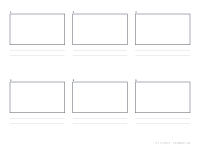
Drawing storyboards on a tablet means you can sketch anywhere, erase without mess, duplicate a frame to try a different angle, and share the result as a PDF straight away. This template puts six 16:9 frames on a landscape tablet page, each with room underneath for notes about action, dialogue and timing.
In a drawing app
In Procreate or another drawing app, import the PNG as the bottom layer and lock it. Draw each shot on a layer above, so you can change frames without touching the template. In a note app such as GoodNotes, import the PDF as a notebook and draw directly on the pages.
Planning tips
Draw the key moment of each shot rather than every movement, and use arrows for camera moves. Number frames so the order is clear. For vertical social video, switch to 9:16 frames; printable versions of every layout are on the storyboard page, and the storyboarding guide covers shot types.
More digital paper sheets
Frequently asked questions
Can I use it in Procreate?
Yes. Import the PNG onto a canvas as a bottom layer and draw on a layer above it.
Which aspect ratios are available?
16:9 by default, plus 4:3, 1:1, 2.39:1 and 9:16 in the generator.
How many frames are on a page?
Six by default, three across and two down, each with two note lines.
Can I share it with a team?
Export the finished pages as a PDF from your app and share the file.
Last updated · About us