Variations
What prints with the starting settings
| Paper | Tablet 3:4 (iPad 10.2/12.9, reMarkable, Kindle Scribe) — 200 × 150 mm (7.87 × 5.91 in), landscape |
|---|---|
| Month | January to December 2027 (12 pages) |
| Week starts | Sunday |
| Margins | 10 mm |
| Line weight | 0.18 mm (bold 0.35 mm) |
| Print setting | Scale 100% / Actual size |
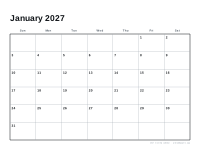
A calendar that lives with your notes
Keeping a monthly calendar in the same app as your notes and planner means everything is in one place: birthdays, deadlines and plans next to the notes about them. This PDF has twelve landscape pages, shaped for 3:4 or 7:10 tablets so each month fills the screen.
Layout choices
The default layout starts weeks on Sunday. Choose the variation with Monday starts and ISO week numbers for European-style planning. Note lines inside each day help keep handwriting tidy if you write several items per day.
Ideas
- Write recurring events in a colour per person or project.
- Insert each month page in front of the weekly pages of the digital weekly planner.
- Use stickers or highlighter strokes for holidays and trips.
For month-by-month notes on 2027, such as clock changes and holidays, see the individual month pages, starting with January 2027.
More digital paper sheets
Frequently asked questions
How many pages does it have?
Twelve, one for each month from January to December 2027, each bookmarked by month.
How do I use it in GoodNotes?
Import the PDF as a new notebook. Use the page thumbnails or outline to jump to a month.
Can I combine it with a planner?
Yes. Most note apps let you insert pages from another PDF, so you can put the month page in front of each set of weekly pages.
Is there a printable version?
Yes, the 2027 calendar prints on Letter or A4.
Last updated · About us