Variations
What prints with the starting settings
| Paper | Tablet 3:4 (iPad 10.2/12.9, reMarkable, Kindle Scribe) — 150 × 200 mm (5.91 × 7.87 in) |
|---|---|
| Layout | Weekly: seven day boxes and a notes box |
| Dates | Undated — reuse every week |
| Margins | 10 mm |
| Line weight | 0.18 mm (bold 0.35 mm) |
| Print setting | Scale 100% / Actual size |
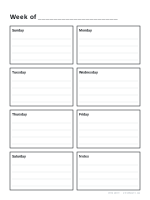
A simple weekly planner
Many digital planners are packed with tabs, stickers and hyperlinks. This one is deliberately simple: one page per week, seven day boxes with lines, and a box for notes or priorities. It loads quickly, works in any note app and never goes out of date if you choose the undated version.
Dated or undated
Undated pages can be duplicated in your note app whenever you need a new week. For a ready-made planner, enter a start date and a page count in the generator: each page then carries the date of its week. The default is the common US layout, starting on Sunday; the Monday start, with day-first dates, suits most of Europe and many workplaces.
Planning a week
- Start with fixed appointments, then add tasks to the days with room.
- Keep three priorities for the week in the notes box.
- Link it with a daily planner for busy days and a habit tracker for routines.
Printable versions and other layouts are on the weekly planner page.
More digital paper sheets
Frequently asked questions
Is it dated?
No, undated by default, so the same page works every week. Enter a start date in the generator and set the number of pages to get a dated planner, one week per page.
How do I make a full year?
Set the start date to the first Monday (or Sunday) of the year and the number of pages to 50, the most one dated PDF holds, then make a second short PDF for the last two or three weeks.
Does it have links between pages?
No, it is a simple page-per-week PDF. Most note apps let you jump between pages with thumbnails or bookmarks.
Can I print it as well?
Yes. Choose Letter or A4 in the full generator for a printable version of the same layout.
Last updated · About us