Variations
What prints with the starting settings
| Paper | Tablet 3:4 (iPad 10.2/12.9, reMarkable, Kindle Scribe) — 200 × 150 mm (7.87 × 5.91 in), landscape |
|---|---|
| Days | 31 (undated) |
| Habit rows | 10 |
| Margins | 10 mm |
| Line weight | 0.18 mm (bold 0.35 mm) |
| Print setting | Scale 100% / Actual size |
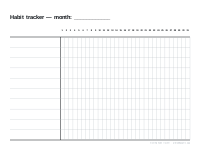
Tick off your days
A habit tracker is one of the simplest and most motivating planner pages: a row per habit, a box per day, and a growing chain of ticks. On a tablet you can colour the boxes, use stickers, or simply tick them with a stylus.
Setting it up
Choose up to ten habits that matter to you and write them down the left-hand column. Keep each one specific: “read 10 pages” rather than “read more”. If you want dates, choose a month and year in the generator and the weekday letters appear above each column, which makes it easy to see patterns such as missed weekends.
Monthly review
At the end of the month, count each row. Drop habits that have become automatic, rethink the ones that never took off, and start the next month’s page. Printable versions, with your own habits typed in or left blank, are on the habit tracker page.
More digital paper sheets
Frequently asked questions
Can I type my habits in before downloading?
Yes. Enter them one per line in the generator and they are printed in the rows; leave the box empty to write them by hand.
Is it dated?
Undated by default with 31 columns. Choose a month and year to show the dates and weekdays.
Why landscape?
Thirty-one day columns need width. In landscape, each column is wide enough to tick comfortably with a stylus.
How do I reuse it each month?
Import the PNG as a template and add a fresh page at the start of each month.
Last updated · About us