Variations
What prints with the starting settings
| Paper | Tablet 3:4 (iPad 10.2/12.9, reMarkable, Kindle Scribe) — 150 × 200 mm (5.91 × 7.87 in) |
|---|---|
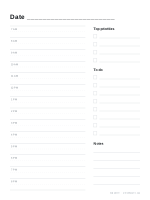
| Layout | Daily: 7 AM–9 PM in half hours, priorities, to-do, notes |
| Dates | Undated — reuse every week |
| Margins | 10 mm |
| Line weight | 0.18 mm (bold 0.35 mm) |
| Print setting | Scale 100% / Actual size |
Time-block your day on the tablet
A daily page with an hour-by-hour schedule is the heart of time-blocking: give each task a slot, and you can see at once whether the day is realistic. On a tablet, blocks are easy to move: erase and rewrite, or use the lasso tool to drag a task to a different time.
What is on the page
The left side is a schedule in half-hour slots. On the right are a short list of top priorities, a to-do list with tick boxes and a notes area for anything else. It is the same layout as the printable daily planner, sized for a 3:4 or 7:10 tablet screen.
Making it a habit
- Fill in the page the evening before.
- Put no more than three priorities at the top.
- At the end of the day, move unfinished tasks to tomorrow’s page.
Pair it with the digital weekly planner for an overview of the week.
More digital paper sheets
Frequently asked questions
What hours does it cover?
7:00 to 21:00 in half-hour slots by default. The schedule can start from midnight to noon and end from 1 pm to midnight.
Can I make dated pages?
Yes. Enter a start date and a page count in the generator, and each page carries the next date.
How do I use the PNG version?
Import it as a page template in your note app and add a new daily page from it whenever you need one.
Does it work on Android tablets?
Yes. The PDF opens in any note app that imports PDFs, such as Samsung Notes or Noteshelf.
Last updated · About us