Variations
What prints with the starting settings
| Paper | US Letter — 215.9 × 279.4 mm (8.5 × 11 in) |
|---|---|
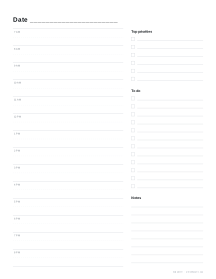
| Layout | Daily: 7 AM–9 PM in half hours, priorities, to-do, notes |
| Dates | Undated — reuse every week |
| Margins | 1/2″ |
| Line weight | 0.18 mm (bold 0.35 mm) |
| Print setting | Scale 100% / Actual size |
Plan the day, hour by hour
A daily page is for days that are too full for a weekly overview: work shifts, school runs, appointments, study sessions and everything in between. Time-blocking each half hour helps you see whether the day is realistic before it starts, and the priorities box keeps the three things that really matter visible all day.
How to use the page
- Priorities first: write the one to three things that would make the day a success.
- Block the schedule: put fixed appointments in first, then give each priority a block of time.
- Collect the rest: smaller tasks go in the to-do list, to fit into gaps.
- Notes: phone numbers, ideas and anything to carry over to tomorrow.
Undated or dated
Undated pages can be printed in a stack and used whenever you need them. Dated pages, with a start date and page count, make a ready-made daily planner for a week or a month; one dated PDF holds up to 50 days. Pair them with a weekly planner for the overview and a habit tracker for routines.
Printing
Print at 100% / Actual size on Letter or A4. For a half-size planner, print on A5 or Half Letter and set a booklet in the page options.
Frequently asked questions
What is on the page?
A schedule in half-hour slots for the hours you choose (7:00 to 21:00 by default), a priorities box, a to-do list and a notes area.
Can I print dated pages?
Yes. In the generator, enter a start date and set the number of pages; each page then carries the next date. Leave the date blank for undated pages you can reuse any day.
Can I change the hours?
Yes. The schedule can start at any hour from midnight to noon and end at any hour from 1 pm to midnight. Fewer hours give taller slots.
How do I make a week of pages?
Set the number of pages to 7 (or 5 for weekdays) and download one PDF. Add a cover and bind it with the notebooks and packs tool.
Last updated · About us