Variations
What prints with the starting settings
| Paper | #10 envelope (4 1/8 × 9 1/2 in) — 241.3 × 104.8 mm (9.5 × 4.13 in), landscape |
|---|---|
| Envelopes | 1 |
| Recipient text | 12 pt |
| Address position | Inside the USPS read area |
| Margins | 0.236″ |
| Line weight | 0.18 mm (bold 0.35 mm) |
| Print setting | Scale 100% / Actual size |
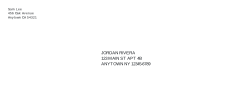
The everyday business envelope
The #10 is the envelope most US offices use for letters, invoices and statements. At 9 1/2 inches wide it leaves plenty of room for a return address in the corner and a recipient block placed well inside the read area that sorting machines scan.
Setting up
- Paste the recipients with a blank line between each.
- Type your return address, or a company name and address.
- Download the PDF, then print page 1 alone as a test.
- Print the rest once the test lines up.
Getting the feed right
Most office printers feed #10 envelopes short edge first with the flap closed, but the direction differs between models. Turn on placement guides, print on plain paper, then mark which edge came out first. Put an envelope in the same way and print one before the batch.
Printing tips
Choose the #10 or Com-10 envelope size in the print dialog and print at 100%. If envelopes curl after printing, let them cool flat under a book before stacking.
More envelope address printer sheets
Frequently asked questions
What size is a
4 1/8 × 9 1/2 inches (about 105 × 241 mm). It takes a sheet of US Letter folded in three.
How do I set up my printer for
In the print dialog choose "Envelope #10" (some printers call it "Com-10") as the paper size, set the scale to 100% or Actual size, and load the envelope as the tray's envelope icon shows.
Can I print a batch of business letters' envelopes?
Yes. Paste every address with a blank line between them; the PDF has one #10 page per address, in the same order.
Why are the addresses in capitals?
USPS Publication 28 recommends uppercase letters and no punctuation for machine sorting. Choose Mixed case if you prefer names as typed.
Last updated · About us