Variations
What prints with the starting settings
| Paper | DL envelope (110 × 220 mm) — 220 × 110 mm (8.66 × 4.33 in), landscape |
|---|---|
| Envelopes | 2 |
| Recipient text | 12 pt |
| Address position | Inside the USPS read area |
| Margins | 6 mm |
| Line weight | 0.18 mm (bold 0.35 mm) |
| Print setting | Scale 100% / Actual size |
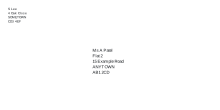
The UK letter envelope
DL is the envelope most UK and European offices use for letters on A4. The recipient is placed left of centre and a little below the middle, leaving the top right for the stamp or franking and the bottom strip clear.
The Royal Mail address format
Royal Mail’s address layout, as set out in its specification published by the Universal Postal Union:
| Line | Example |
|---|---|
| Addressee | Ms A Patel |
| Flat or building | Flat 2 |
| Number and street | 15 Example Road |
| Locality, if any | Example Village |
| POST TOWN, in capitals | ANYTOWN |
| POSTCODE, in capitals, alone | AB1 2CD |
Leave out commas and full stops, keep every line to the same left margin, and add the country in capitals on a final line only for mail going abroad.
Printing tips
In the print dialog choose “Envelope DL” as the paper size and set the scale to 100% or Actual size. Feed one envelope first as the tray icon shows; if the address prints on the wrong side, turn the envelope over and try again.
More envelope address printer sheets
Frequently asked questions
What size is a DL envelope?
110 × 220 mm. It takes an A4 sheet folded in three. C5 (162 × 229 mm) takes A4 folded once, and C6 (114 × 162 mm) takes A4 folded twice.
How should a UK address be laid out?
Name, then building and street, then any locality, then the post town in capitals on its own line, then the postcode in capitals alone on the last line, with one space between its two halves and no punctuation.
Do I need the county?
No. Royal Mail no longer needs the county when the post town and postcode are given.
Where does the return address go?
This printer puts it in the top left. In the UK it is also common to write it on the back flap; leave the box empty to print only the recipient.
Last updated · About us