Variations
What prints with the starting settings
| Paper | US Letter — 215.9 × 279.4 mm (8.5 × 11 in) |
|---|---|
| Items printed | 12, with 14 blank lines |
| Lines per page | 26 |
| Line spacing | 9 mm |
| Margins | 1/2″ |
| Line weight | 0.18 mm (bold 0.35 mm) |
| Print setting | Scale 100% / Actual size |
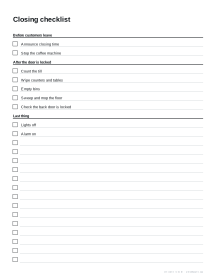
A checklist for anything you repeat
Checklists are used in aviation, surgery and kitchens for a simple reason: routine jobs are where steps get missed. The step you have done a thousand times is the one you forget on a busy day. A printed list, ticked in order, catches it.
How to write a good one
- Keep each step short and checkable. “Alarm on” rather than “Make sure the building is secure”.
- Group steps under headings in the order you do them, so the list follows you around the room.
- Only include the steps that matter. A checklist of forty trivial items gets skimmed; one of ten essential items gets used.
- Test it once by following it exactly, and fix anything that is out of order.
Ideas
- Opening and closing a shop, café or classroom.
- Weekly home and car maintenance.
- A new starter’s first-week tasks.
- Getting a holiday rental ready between guests.
For lists you pack from, start from the packing list; for children’s daily jobs, a chore chart gives a box for every day of the week.
Printing tips
Print at 100% on Letter or A4. For a checklist used daily, laminate one and use a dry-wipe pen, or keep a clipboard of printed copies as a dated record.
More to-do list sheets
Frequently asked questions
How do I make my own checklist?
Type each step on its own line in the Items box. Start a line with # to make a heading, such as "# Last thing". Change the title, check the preview and download the PDF.
Can I leave space for extra items?
Yes. Any lines after your items print with empty tick boxes. Increase the line spacing for fewer, larger lines, or reduce it to fit more.
Can I save my checklist?
Use Copy link to keep a link that rebuilds the same checklist, or save it as a preset on this device. Nothing is uploaded; the link holds the settings.
Why use a paper checklist for a routine job?
A checklist catches the steps that are easy to skip when a job becomes routine. Ticking a paper copy also leaves a record that the job was done, which a manager or the next person can see.
Last updated · About us