Variations
What prints with the starting settings
| Paper | A7 envelope (5 1/4 × 7 1/4 in) — 184.2 × 133.4 mm (7.25 × 5.25 in), landscape |
|---|---|
| Envelopes | 3 |
| Recipient text | 13 pt |
| Address position | Inside the USPS read area |
| Margins | 0.236″ |
| Line weight | 0.18 mm (bold 0.35 mm) |
| Print setting | Scale 100% / Actual size |
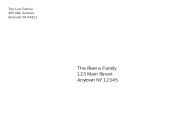
The card list, printed once
Writing addresses is the slowest part of sending holiday cards. Paste the list here once, and every envelope prints in the same order with your return address in the corner. Keep the list in a note or a saved link, and next year’s envelopes take minutes.
Setting up
- Choose A7 for 5 × 7 inch cards, or A2 for smaller note cards.
- Paste the addresses, a blank line between households.
- Add your return address, such as “The Lee Family” and your street.
- Print one test envelope, then the rest.
The recipient text is 13 pt here, a little larger than for business mail, and shrinks automatically if a name is long.
Tips
- Print before you stuff the envelopes so a misfeed costs an envelope, not a card.
- Use dark ink. Postal machines read black or dark blue on light envelopes best; metallic or very pale envelopes may need a white address label instead.
- Keep the bottom strip clear of stickers and decorations, because the post office prints its barcode there.
Printing tips
Choose the A7 (or A2) envelope size in the print dialog, set the scale to 100% or Actual size, and feed the envelopes as the printer’s tray icon shows.
More envelope address printer sheets
Frequently asked questions
Which envelope fits a 5 × 7 card?
An A7 envelope, 5 1/4 × 7 1/4 inches. Smaller 4 1/4 × 5 1/2 inch cards go in A2 envelopes, 4 3/8 × 5 3/4 inches.
How do I paste my card list?
Put each address on its own lines, with a blank line between households. From a spreadsheet, copy the name, street and city columns into a text editor first so each part sits on its own line.
Can I use it for wedding invitations?
Yes. A7 is the usual invitation envelope. Write names in full, such as "Mr and Mrs Jordan Rivera", and leave capital letters off for a more formal look.
Will my printer take small envelopes?
Most inkjet and laser printers accept A7 and A2 envelopes through a rear or manual feed slot. Check the printer's smallest supported size, and print one test first.
Last updated · About us