Variations
What prints with the starting settings
| Paper | A4 — 210 × 297 mm (8.27 × 11.69 in) |
|---|---|
| Line spacing | 8 mm = 0.315″ |
| Cue column | 60 mm |
| Summary box | 50 mm |
| Margins | 10 mm |
| Line weight | 0.18 mm (bold 0.35 mm) |
| Print setting | Scale 100% / Actual size |
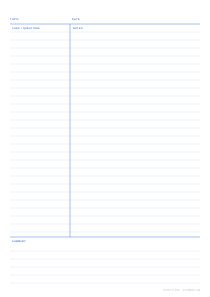
Metric Cornell notes for A4
The original Cornell layout was designed in inches for American Letter paper. Printed on A4 it still works, but the numbers are awkward. This version redraws the page in millimetres: a 60 mm cue column, a 50 mm summary box and 8 mm lines, all inside 10 mm margins. A heavy rule frames each area and the page carries the usual Topic, Date, Cues / Questions, Notes and Summary labels.
A4 is 18 mm taller but 6 mm narrower than Letter. At 8 mm the page gives 26 note lines and five summary lines, and more if you choose a narrower ruling.
The proportions are close to the American original, so if your study group mixes Letter and A4 printouts the sheets still feel the same in use: the cue column takes close to a third of the width and the summary box a little under a fifth of the height. That consistency matters more than it sounds when you are flipping through a binder before an exam.
When to change the defaults
- 6 mm lines suit university students who write compactly and want the most text per page.
- 7.1 mm reproduces American college ruling, handy for exchange students or anyone matching notes made in the US.
- 70 mm cue column gives more room in subjects with long technical terms, or for students who write full questions rather than single keywords.
- Name, subject & date fields make it easy to file loose sheets by course.
Prefer B5 (176 × 250 mm)? It is a common size for student notebooks and is offered as a one-click PDF above with the same 60 mm and 50 mm proportions. For the inch-based original, see the Letter Cornell template.
Printing on A4
Choose Actual size (or Scale 100%) and check that the cue column measures 60 mm from the left edge of the frame to the vertical rule. A4 printers outside North America need no further setup; if you are on a US printer with A4 paper loaded, make sure the paper size in the print dialog is also A4 so the driver does not rescale. For a stack, set Pages in the PDF and turn on page numbers; for ring binders, widen the left margin first.
More cornell notes sheets
Frequently asked questions
Why is the cue column 60 mm instead of 2.5 inches?
2.5 inches is 63.5 mm. On A4 a round 60 mm keeps nearly the same proportion of the page, is easier to measure if you rule your own, and leaves a few more millimetres for notes on a page that is narrower than US Letter.
How many lines does the A4 Cornell page have?
At 8 mm spacing there are 26 note lines and five lines in the summary box. Switch to 6 mm lines for 35 and seven, or to 7.1 mm for 29 and six.
Which line spacing is standard on A4?
There is no single standard. 8 mm is the most common ruling in UK exercise books and refill pads, while 6 mm and 7 mm are popular for students with smaller handwriting. Choose whichever matches the notebook you normally use.
Can I print this for an A5 binder?
A 60 mm cue column would take up almost half of an A5 page, so it is better to pick A5 in the generator and reduce the cue column to about 40 mm and the summary to about 35 mm. B5, offered above, is the smallest size that keeps these metric proportions comfortable.
Do the holes of a 2- or 4-ring binder hit the cue column?
The default 10 mm margin is narrower than a punched hole line. If you will punch the pages, open Advanced options and set the left margin to about 20 mm, or turn on alternate margins for binding when printing double-sided.
Last updated · About us