Where the method comes from
The Cornell note-taking system was developed in the 1950s by Walter Pauk, who taught and directed a reading and study centre at Cornell University. He set it out in his book How to Study in College, which became a standard study-skills text and stayed in print through many editions. The method has outlived the book’s original audience: it is taught in middle schools, high schools and universities, and is widely used outside the US.
The core idea is simple. A page divided into three areas lets you take notes, turn them into study questions and condense them into a summary, all on the same sheet. You don’t need to rewrite your notes to study them; the layout builds the review in.
The page layout
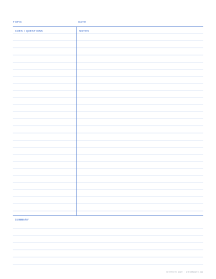
A Cornell page has four parts:
- Header. A strip at the top for the topic, course and date.
- Notes column. The large area on the right, where you write during the lecture or while reading.
- Cue column. A narrower column on the left, left empty during the lecture and filled in afterwards.
- Summary area. A band across the bottom of the page for a short summary in your own words.
- US Letter2 1/2 in cues, 2 in summary, college ruled
- A460 mm cues, 50 mm summary, 8 mm lines
Dimensions
Pauk’s original layout was designed for an 8½ × 11 inch sheet:
| Area | Pauk’s layout (Letter) | Our A4 version |
|---|---|---|
| Cue column width | About 2½ in (63.5 mm) | 60 mm |
| Summary area height | About 2 in (50.8 mm) | 50 mm |
| Notes column | The rest: 5 in inside half-inch margins | The rest: 130 mm inside 10 mm margins |
| Line spacing | College ruled, 9/32 in (7.1 mm) | 8 mm, the usual A4 ruling |
| Writing lines per page | 32 (26 wide ruled) | 31 (35 at 7.1 mm) |
Our Cornell notes template uses the Letter measurements inside half-inch margins, with a header band labelled Topic and Date and section labels for Cues / Questions, Notes and Summary. The A4 version uses the round metric figures. You can change both widths in the generator if your handwriting or subject needs a different balance: a wider cue column for language learning, say, or a taller summary for literature classes.
The five Rs
Pauk described the method as a sequence of steps that came to be known as the five Rs. In his book the second step is Reduce; many teachers now call it Question, since the reduction is done by writing questions. Both describe the same work.
1. Record
During the lecture, write in the notes column only. Capture main ideas, facts and examples, not every word. Use abbreviations, short phrases and bullet points. Leave a gap between ideas so you can add detail later. Don’t worry about the cue column or summary yet.
2. Question (or Reduce)
As soon as possible after class, read through your notes and write cues in the left column. Cues are short questions or keywords that the notes beside them answer: “What causes inflation?”, “Three branches of government”, “Define osmosis”. Writing questions forces you to identify what matters, and it turns the page into a self-test.
3. Recite
Cover the notes column with a sheet of paper so only the cues show. Read each cue and answer it aloud, in your own words. Then uncover the notes and check. Reciting is the step most people skip, and it is where much of the learning happens: you are practising recall rather than just re-reading.
4. Reflect
Think about how the material fits together and with what you already know. What is the big idea? How does it connect to last week’s lecture or the reading? Write your summary at the bottom of the page: two to four sentences that capture the main points. If you can’t write a summary, that’s a sign you need to revisit the material.
5. Review
Spend a few minutes reviewing your notes regularly, not just the night before the exam. Cover the notes, run through the cues, read the summaries. Short, spaced reviews over days and weeks are more effective than one long session, and a stack of Cornell pages makes that quick to do.
What the research says
Studies of the Cornell layout itself are small and their results mixed. Some find that students taught the method take clearer notes or recall more; others find no difference in grades, and one found Cornell notes helped students apply ideas while guided notes were better for plain recall.
The habits the layout builds in have much stronger evidence. Reciting from the cues is retrieval practice: testing yourself instead of rereading. In a well-known experiment, students read a short passage and then either reread it three more times or tried to recall it three times. Five minutes later the rereaders did slightly better; a week later the picture had reversed.
The same study found that rereaders felt more confident about remembering, which is why rereading feels productive even when it isn’t. The cue column turns every page into a ready-made self-test, and the review step spaces those tests out.
Tips for making it work
- Leave the cue column empty during class. The method depends on filling it in afterwards. Filling it during the lecture turns it into a second notes column.
- Write cues as questions. “Why did the empire fall?” is more useful for recitation than “Fall of the empire”.
- Keep summaries short. If the summary runs past the box, you are rewriting the notes rather than summarising them.
- One topic per page. Start a new sheet for a new lecture or chapter so the summary has a clear subject.
- Date and number pages. Add header fields for Date and Page in the generator so notes stay in order in a binder.
Choosing a template
The generator lets you change everything about the page:
- Notes area: lined (default), dot grid for subjects with diagrams or equations, or blank for sketches.
- Line spacing: college ruled 7.1 mm by default; switch to wide ruled 8.7 mm for younger students or large handwriting. See which ruling for which grade for guidance.
- Cue column and summary: adjust the widths to suit the subject.
- Section labels: on by default; turn off for a cleaner look once students know the layout.
- Header fields: add Name, Class, Period or Subject for classroom use.
For a semester’s supply, set Pages in the PDF to 50 or 100, switch on page numbers and alternate margins for binding, and print double-sided. Hole-punch along the wider margin and the pages go straight into a binder.
Cornell notes beyond school
The format works anywhere you need to absorb information and come back to it. Professionals use it for meeting notes (actions and owners go in the cue column), training sessions and conference talks. Readers use it for non-fiction books. The same three-part page that helps a student revise for an exam helps anyone turn a page of notes into something they can use later.