Variations
What prints with the starting settings
| Paper | US Letter — 215.9 × 279.4 mm (8.5 × 11 in) |
|---|---|
| Line spacing | 5 mm = 0.197″ |
| Cue column | 2 1/2″ |
| Summary box | 2″ |
| Margins | 1/2″ |
| Line weight | 0.18 mm (bold 0.35 mm) |
| Print setting | Scale 100% / Actual size |
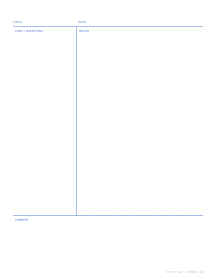
Cornell structure, grid freedom
Lined Cornell paper is ideal for lecture notes made of sentences. It is less ideal when half the lecture is on the board as graphs, circuits or structural formulas. This template keeps everything that makes the Cornell method work (the top strip with Topic and Date, the left cue column, the summary box) and replaces the lines in the notes area with a 5 mm dot grid. On Letter the cue column is 2 1/2 inches and the summary 2 inches; on A4 they switch to 60 mm and 50 mm.
The dots are small and printed in a soft blue, so text written over them stays readable. Count along them to draw a scaled sketch, line up columns of numbers, or rule a quick table with a straight edge.
A practical way to use the grid: write text on every second row of dots, and when a diagram comes up, let it span as many rows as it needs, then carry on writing below it. Use the cue column for formulas to memorise, the names of diagrams, or questions such as “why does the current lag here?” Your summary at the bottom ties both kinds of note together.
Who it suits
- STEM students who switch constantly between prose, equations and diagrams.
- Bullet journalers using the Cornell method for book notes, courses or meeting notes; the 5 mm pitch matches most dot grid notebooks.
- Visual thinkers who prefer mind-maps or sketchnotes but still want a cue column for review questions.
If your class notes are mostly text, the ruled Cornell template gives you more defined lines to write on.
Choosing spacing and printing
The blank cue column has a second advantage on this layout: with no dots to compete with, short questions and keywords stand out clearly when you skim a stack of pages before an exam.
5 mm is the familiar bullet-journal pitch. The 1/4 inch variation spaces the dots at 6.35 mm, which feels more open and matches US graph paper if you are moving work between the two. Print at Actual size; the dots are vector circles, so they stay crisp even on an older laser printer. For a ring-bound set, print 30 or more pages at once with page numbers switched on so you can file them in order.
More cornell notes sheets
Frequently asked questions
Why use dots instead of lines for Cornell notes?
Dots work as lines for text and as a grid for everything else. In maths, physics and chemistry you can write a sentence, then draw a free-body diagram or a small table on the same grid without fighting horizontal rules.
Where are the dots printed?
Only in the notes area. The cue column and summary box are left blank, which keeps your questions and summary visually separate from the working notes and makes the page easier to scan when you review.
How many dots are in the notes area?
With 5 mm spacing on Letter the notes area has 25 columns by 37 rows, 925 dots in total. A4 has 25 by 42. The 1/4 inch variation gives 19 by 29 on Letter.
Can I write on every row with 5 mm dots?
Only if your handwriting is very small. Most people write on every other row, which works out to 10 mm lines, or let text sit between two rows of dots. The grid stays useful for diagrams either way.
Will the dots show up after scanning?
At the default colour they usually do, faintly. If you scan or photocopy your notes for a study group, the pale grey variation drops out much better while still being visible when you write.
Last updated · About us