Variations
What prints with the starting settings
| Paper | US Letter — 279.4 × 215.9 mm (11 × 8.5 in), landscape |
|---|---|
| Vanishing points | 1 |
| Lines from each point | 36 |
| Margins | 1/2″ |
| Line weight | 0.18 mm (bold 0.35 mm) |
| Print setting | Scale 100% / Actual size |
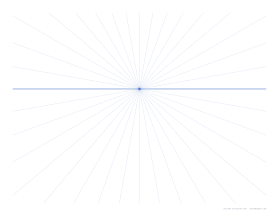
The easiest perspective
One-point perspective is usually the first one taught, because it only has one rule beyond straight horizontals and verticals: every line that goes straight away from the viewer meets at the vanishing point. With the guide lines already printed, you can draw a convincing room or street in minutes.
Drawing a room
- Draw the back wall as a rectangle around the vanishing point.
- Follow guide lines from its corners to the edges of the page to make the floor, ceiling and side walls.
- Add a door on a side wall: its top and bottom edges follow guide lines; its sides stay vertical.
- Place furniture as boxes, with front faces as rectangles and depth lines along the guides.
Practice ideas
- Letters in 3D: write a word in block capitals and extrude every corner back towards the point.
- A railway track or road vanishing into the distance, with evenly spaced sleepers getting closer together.
- A bookshelf or a city street.
For buildings seen from a corner, use the two-point grid on the perspective grid page; for tall buildings seen from below, the three-point grid. The perspective drawing guide covers the theory.
Printing
Print in landscape at 100% / Actual size. Use it under layout paper or tracing paper to reuse the grid.
More perspective grid sheets
Frequently asked questions
When do I use one-point perspective?
When you face the main surfaces of a scene straight on: looking down a road, into a room, along a corridor or at the front of a building. Lines going away from you meet at one point; vertical and horizontal lines stay straight.
Where is the vanishing point?
On the horizon line, in the middle of the page. The horizon sits 40% of the way down by default, which is a natural eye level.
Can I move the horizon?
Yes. In the generator, set the horizon from 15% to 85% of the page height. A high horizon looks down on the scene; a low one looks up.
How do I draw on it?
Place a sheet of thin paper over the grid or draw lightly on it in pencil, and use the lines as guides for every edge that goes into the distance.
Last updated · About us