Variations
What prints with the starting settings
| Paper | US Letter — 215.9 × 279.4 mm (8.5 × 11 in) |
|---|---|
| Range | -10 to 10 in steps of 1 |
| Lines per page | 8 |
| Margins | 1/2″ |
| Line weight | 0.18 mm (bold 0.35 mm) |
| Print setting | Scale 100% / Actual size |
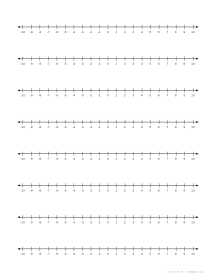
Zero in the middle
Negative numbers are easiest to understand as positions: to the left of zero instead of to the right. On these number lines, zero sits in the centre with the positives to the right and the negatives to the left, so children can see that −7 is less than −2 because it is further left, even though 7 is bigger than 2.
Activities
- Temperature changes: it is −3 °C at night and warms by 8 degrees; where do you land?
- Ordering: mark −6, 4, −1, 0 and 9 on one line, then write them from least to greatest.
- Distance from zero: circle pairs like −5 and 5 to introduce absolute value.
- Number sentences: draw a jump for each step of 4 − 7 and write the answer.
Range and spacing
The −10 to 10 line has 21 labelled ticks across the width of the page, wide enough to draw jumps with arrows. For larger values, use the −20 to 20 variation with labels every two. When integers lead on to graphing, the coordinate plane uses the same idea in two directions.
Printing
Print at 100% / Actual size. Eight lines per page gives one line per problem on a typical worksheet; choose four lines for longer written explanations.
More number lines sheets
Frequently asked questions
How do I add a negative number on a number line?
Start at the first number and move left by the size of the negative number. For 3 + (−5), start at 3 and move five steps left to land on −2.
How is subtracting a negative shown?
Subtracting a negative reverses direction, so you move right. For −2 − (−6), start at −2 and move six steps right to 4.
What does the blank version leave out?
Only the two end numbers are printed, −10 and 10. Children write the rest, including zero, which is a quick check that they understand the order of negative numbers.
Can I change the range?
Yes. In the generator, set any start and end between −100 and 1,000, and choose how often numbers are labelled.
Last updated · About us