Variations
What prints with the starting settings
| Paper | US Letter — 215.9 × 279.4 mm (8.5 × 11 in) |
|---|---|
| Cards per page | 10 (2 × 5) |
| Card size on this page | 3.75 × 2.00 in |
| Your cards | 10 cards, fronts and backs on alternate pages |
| Margins | 1/2″ |
| Line weight | 0.18 mm (bold 0.35 mm) |
| Print setting | Scale 100% / Actual size |
Make flashcards in a minute
Type or paste your list, one card per line, with the front and back separated by a bar: Gracias | Thank you. The preview fills in as you type. Each card is numbered on both sides, so a dropped stack is easy to sort.
Two ways to print
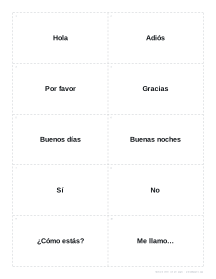
Double-sided. The PDF alternates a page of fronts with a page of backs. The backs are mirrored (left to right on an upright page, top to bottom on a sideways one), so when you print double-sided and flip on the long edge, every answer lands behind its question. The back pages carry only the answers, without the title or QR code. Ten cards fit on a page (or twelve smaller ones).
Fold-over. Front and back sit side by side in each row, five cards to a page. Cut along the dashed lines, fold along the solid line and glue or tape the halves. It needs no duplex printer and the two sides always match.
Tips
- Print on card stock (160 to 200 g/m²) so the answers don’t show through.
- Keep fronts short: one word, a date, a formula or a question.
- Paste two columns from a spreadsheet; tabs are understood as the split.
- Make a separate set for each topic, and press Copy link to save the list for next time.
More flashcards & labels sheets
Frequently asked questions
How do I type the front and back of each card?
One card per line, with a vertical bar between the front and the back, for example "Paris | Capital of France". A tab or " = " works too, so you can paste two columns from a spreadsheet.
Will the backs line up with the fronts?
Yes, when you print double-sided and flip on the long edge. The answers page is laid out as a mirror image, so the back of the top-left card prints behind it. Print at 100% and try one sheet first; if your printer shifts the back slightly, use the fold-over layout instead.
My printer can't print double-sided. What now?
Choose the fold-over layout. Each row has the front on the left and the back on the right; cut along the dashed lines and fold along the solid line. Or print the fronts, put the paper back in the tray, and print the answers page.
How long can the text be?
A few words on the front and a sentence or two on the back work best. Long text is shrunk to fit the card, down to a readable size, and shortened with an ellipsis if it still does not fit.
How should I study with them?
Test yourself from the front, sort the cards you missed into a pile to see again sooner, and review the rest less often. Our guide to making flashcards for study explains the Leitner box method.
Last updated · About us