Variations
What prints with the starting settings
| Paper | US Letter — 215.9 × 279.4 mm (8.5 × 11 in) |
|---|---|
| Prints | 180° protractor, 1° ticks |
| Accuracy | Exact at 100% / Actual size; use the calibration wizard to correct printer scaling |
| Margins | 1/2″ |
| Line weight | 0.18 mm (bold 0.35 mm) |
| Print setting | Scale 100% / Actual size |
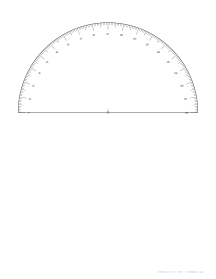
A protractor when you need one
Protractors go missing just before maths homework. This printable version is accurate to a degree, large enough to read easily, and takes a minute to print and cut out. Because it’s paper, you can also make several for a class or a group activity.
Measuring well
- Cut out the semicircle and the baseline carefully; the centre point must stay on the edge.
- Place the centre point exactly on the vertex of the angle.
- Line the baseline up with one arm of the angle.
- Read the scale where the other arm crosses it, counting from the 0 on the side of the first arm (subtract from 180 if that arm points right). Angles more than 90° are obtuse, so check that your answer makes sense.
For reflex angles (more than 180°), measure the smaller angle and subtract it from 360°.
Checking scale and shape
A protractor only needs a correct shape, but if you also print the rulers, use the calibration wizard so your printer’s scaling is corrected for everything you print. For angle drawing practice, polar graph paper in degrees has rays at regular angles.
Printing
Print at 100% / Actual size on card stock, or on transparency film for a see-through protractor.
Frequently asked questions
Is a printed protractor accurate?
Angles do not depend on scale, so a protractor printed slightly too large or small still measures angles correctly, as long as the printer does not stretch one direction more than the other. Printing at 100% / Actual size keeps it true.
How big is it?
The radius is up to 90 mm, as large as Letter or A4 allows, which makes single degrees easy to read.
How do I measure an angle?
Put the centre mark on the angle's corner, line up the baseline with one arm, and read where the other arm crosses the scale. The scale runs from 0 on the left to 180 on the right; if the arm you lined up points right, subtract the reading from 180.
Can I make it see-through?
Print it on overhead transparency film or tracing paper, or laminate a paper copy and trim it to the semicircle.
Last updated · About us